
Personal landing pages for every partner
Each affiliate gets their own page with their name and their bonus package, loaded live from the casino's admin panel. The player signs up through it, and the bonuses land on the new account without a promo code.

What is a partner landing page?
A page at an address of its own for each affiliate — your-domain/partner-name — that shows the partner's name and image, the bonus package agreed for their audience, and a sign-up button that takes the player to the casino through the partner's tracking link.
One deployment serves every partner. A new affiliate does not need a page designed, a developer or a new domain: once they are approved and have a landing address in the admin panel, their page exists. An address that does not belong to an approved partner returns a plain 404.
It is available to any brand on the platform on request, at no extra charge. It works alongside the affiliate programme: the partner portal, commission and payouts stay where they are, and the landing page becomes the thing partners send traffic to.
Where do the bonuses on the page come from?
From the casino's own admin panel, on every view. The page asks the casino which bonuses are attached to this partner — or to this campaign — and shows them as they are configured. Nobody copies terms onto the page by hand.
Each partner, and each of their campaigns, can have its own set of welcome bonuses in the bonus system. A link with a campaign code shows that campaign's set; without one, the partner's set; and if neither is configured, the casino's standard welcome bonuses. The page always shows what the player will actually receive.
Because the page reads the live configuration, changing a partner's offer in the admin panel changes their landing page within about a minute. There is no second copy of the terms to drift out of date — which is the usual way a landing page ends up promising a bonus the casino no longer gives.
How does the player receive the bonuses?
By signing up through the button on the page. The bonuses are tied to the partner's link rather than to a code, so the player creates an account and finds the package waiting in the bonuses section of their profile.
Removing the promo code removes a step where players drop off and a way for codes to leak onto coupon sites, where they get used by traffic the partner did not bring. The package applies to new accounts only; it cannot be added to an existing one.
The same click that attaches the bonuses is counted for the partner, so it appears in their statistics in the partner portal and in the operator's partner list.
What does the page show about each bonus?
The type, the headline amount, the partner's description, and the terms that decide what the bonus is worth: minimum deposit, maximum bonus, wagering, maximum withdrawal and the date it expires.
Showing the wagering and withdrawal limits up front costs a little conversion and saves a lot of support. A player who read the terms before signing up does not open a ticket when the bonus turns out to need wagering.
- Package summary
- Every bonus in the set, numbered in the order the player receives them, next to the sign-up button.
- Bonus cards
- One card per bonus with its terms, in the currency of the offer.
- How to claim
- Four short steps from the button to the bonuses section of the player's profile.
- Questions
- Answers to what players ask before signing up: promo codes, existing accounts, wagering.
How is the page branded?
With the casino's name, logo and two colours — a background and a brand colour. The rest of the palette is derived from those two, including whether the page is light or dark and which text colours stay readable on each surface.
The partner's own name and image, entered in the admin panel, appear in the headline and in a short section explaining that the offer was agreed for their audience. Without a name, the page falls back to the casino's welcome package.
Pages are available in English, Polish and Russian. The language is picked from a parameter in the link or the visitor's browser, with a default set per brand, and bonus texts are shown in that language where a translation exists in the admin panel.
Where does the landing page run?
On Cloudflare's edge, in the operator's own Cloudflare account and on a domain the operator chooses. Our team deploys it; the operator provides the domain and access to the account.
Running in the operator's account means the domain and the deployment stay theirs. Responses from the casino are cached at the edge for about a minute, so a partner's traffic spike hits Cloudflare rather than the casino's backend.
Partner links take the form your-domain/partner-name, with an optional campaign code and language, and any further tracking parameters in the link are passed on to the partner's tracking link.
What does it take to give a partner a page?
Approve the partner, give them a landing address in the admin panel, and optionally a display name, an image and their own bonus set. The page is live as soon as that is saved.
The one-time setup for a brand — domain, colours, logo, default language — is done by our team when the landing is requested. After that, every new partner is a matter of a few fields in the back office. How partners are approved and paid is on the affiliate programme page, and why a team with its own traffic might want its own brand instead is on affiliate teams.
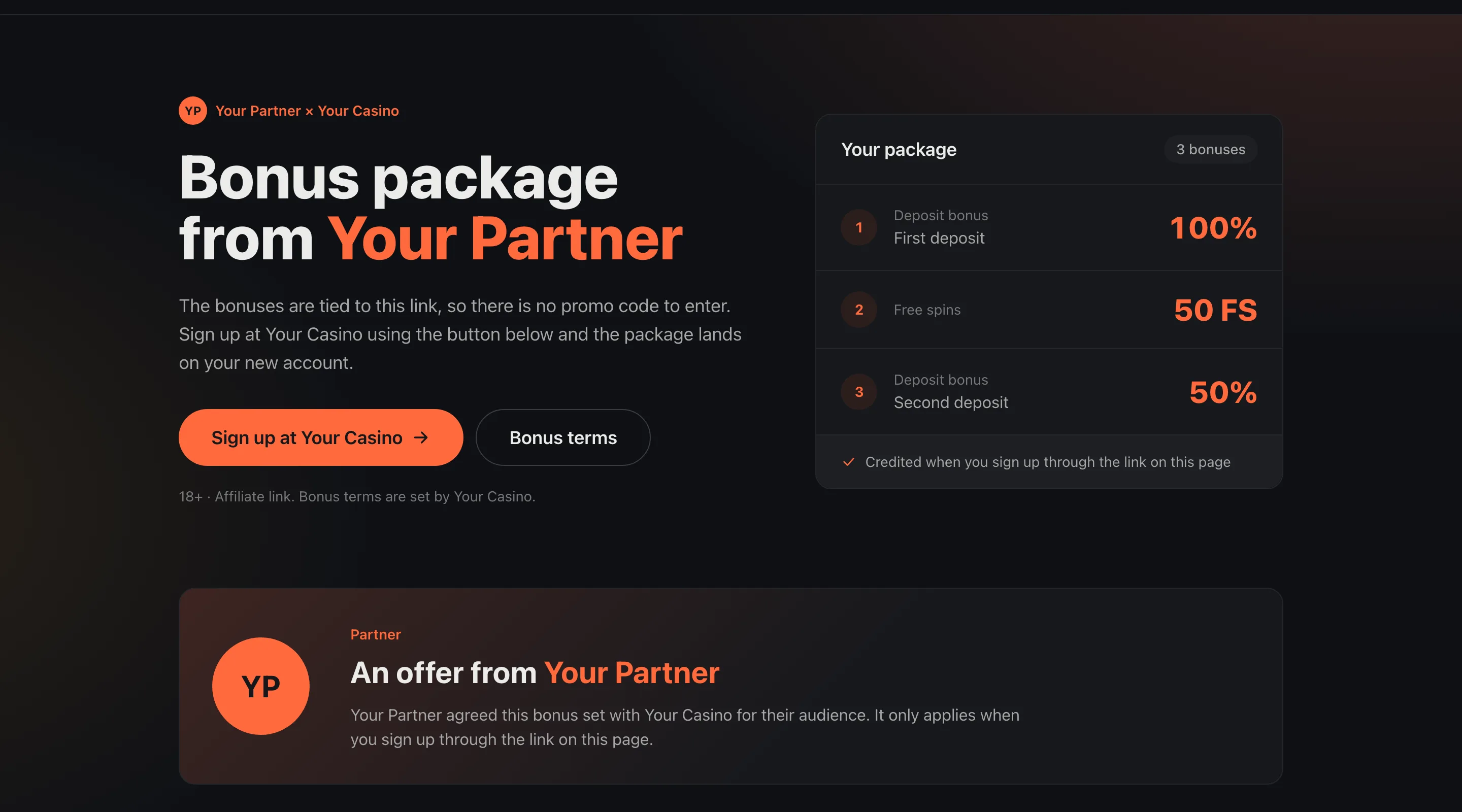
A partner landing page
The top of a partner page with placeholder names: the partner's headline, the three-bonus package loaded from the admin panel, and the sign-up button.
Read next
Partner landing page questions
Does every partner need their own page built?
No. One deployment serves every partner. A partner's page exists as soon as they are approved and have a landing address in the admin panel.
Do I have to update the page when I change a partner's bonuses?
No. The page reads the bonuses from the admin panel, so a change appears on it within about a minute.
Does the player need a promo code?
No. The bonuses are tied to the partner's link, and the player receives them by signing up through the button on the page.
Can one partner show different offers to different audiences?
Yes. Each campaign can have its own bonus set, and a link with that campaign's code shows it.
Which languages are supported?
English, Polish and Russian, chosen by a link parameter or the visitor's browser, with a default per brand.
Does it cost extra?
No. It is set up on request for any brand on the platform, at no extra charge.
See a partner page for your brand
We will show a landing page on your colours with a partner's bonus set from the admin panel, and walk through setting one up.